Software for PPF and window tint shops
HAUT Software — pattern cutting for PPF and window tinting shops
Open a vehicle, lay it out, cut it. HAUT Software is a fast native app for Mac and Windows with a growing catalog of ready-to-cut patterns, true-shape nesting that saves real film, and direct support for the plotters your shop already owns.
- Under 12 MB to install
- 2,500+ vehicles, growing weekly
- Mac and Windows
The problem
The software your shop runs was not built for your shop
It was built for sign makers, and PPF and tint shops have been living with it for a decade.
A 1.6 GB installer and an afternoon gone
Forty-eight thousand files and six runtime redistributables to get one new machine cutting. HAUT Software is under 10 MB and installs in under a minute.
Windows only
If your shop runs Macs, you buy a PC just to cut film. HAUT Software runs natively on both — one universal build for Apple Silicon and Intel.
Menus full of things you never use
Rhinestone tools, braille, print queues, menu-board wizards. Hundreds of commands, and a PPF or tint shop uses maybe thirty. Everything a film shop needs. Nothing a sign shop needs.
One desk, one person, one bottleneck
Whoever is at the cutting computer is the only person who can quote a job. Every HAUT Software license includes a second seat for the front desk.
The app
Three screens, and there is nothing else to learn
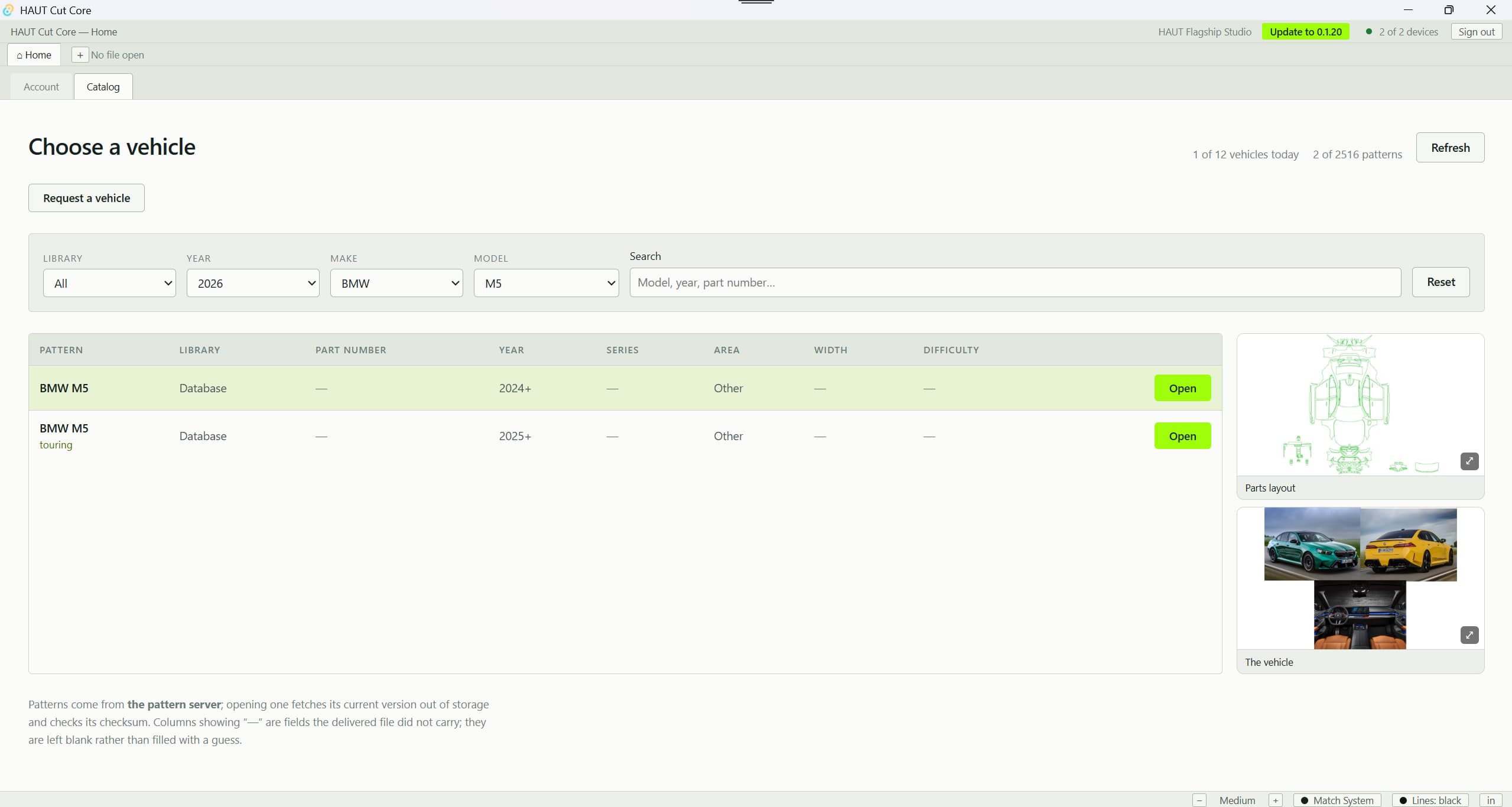
No modules, no wizards, no second program to learn. The shop opens to its own numbers, finds the car, and cuts it — and every screenshot below is the shipping app, at the size it runs on a shop monitor.
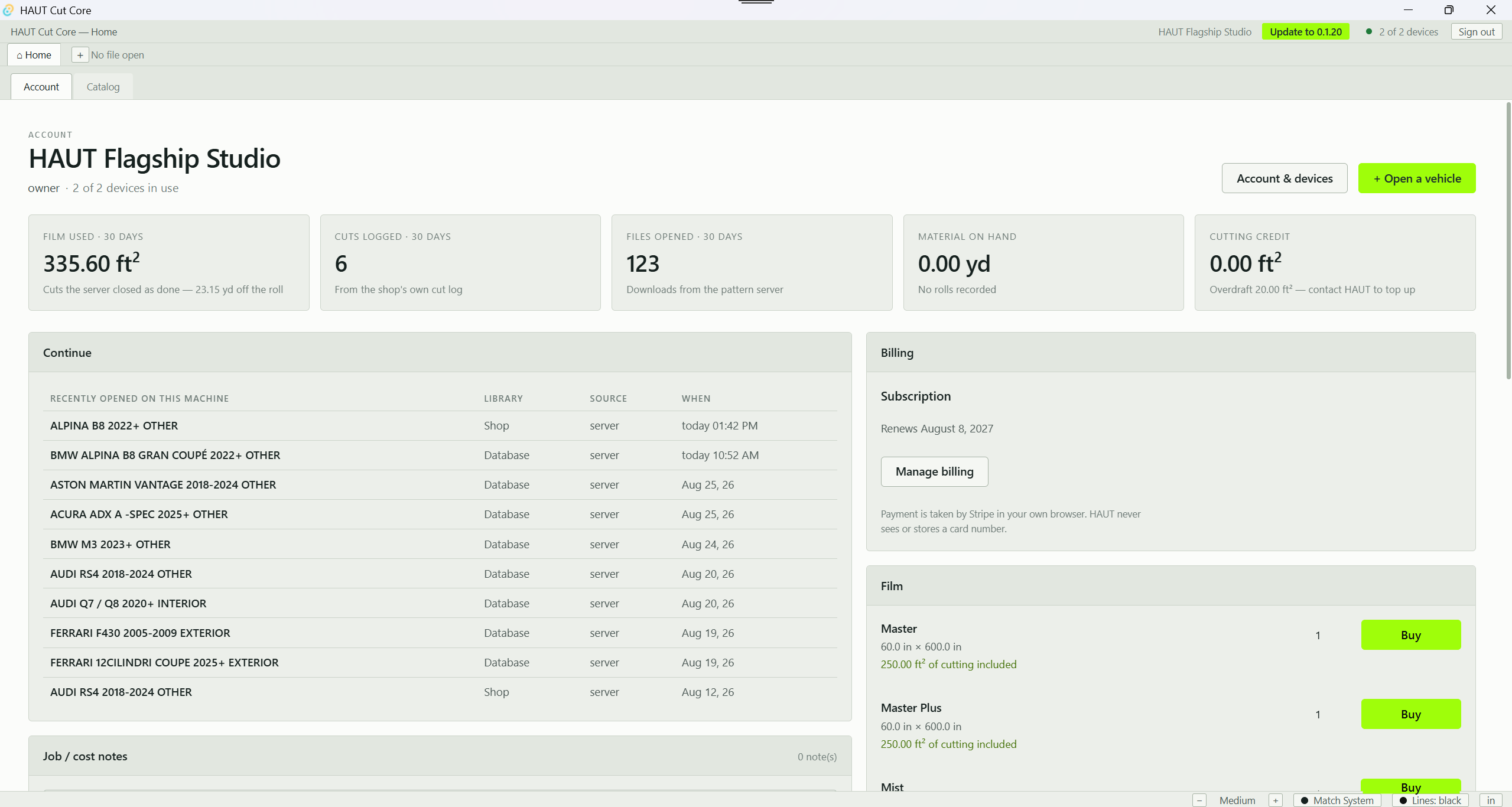
- Film used, cuts logged, files opened and material on hand — the last thirty days of the shop, on the screen the app opens to.
- Continue where the shop left off: every file this machine has opened, which library it came from and when.
- Renewal date and the billing portal sit beside HAUT film by the roll, each roll listed with the cutting credit it carries.
What it does
Built by people who install film for a living
It saves film on every job
True-shape nesting interlocks parts by their real outline, not their bounding box. On a real delivered kit, a scattered layout spanning 83.5 inches of a 60-inch roll packed into 21.6 inches of it, at 78.8 % density, in about three seconds.
It nests one part at a time
Right-click a panel, Add to Blank, and it drops into the first real gap on the film — the way a shop works when a customer buys a front end rather than a full kit.
It knows your material
Roll presets fill in the usable width, not the marketing width, so a 60-inch roll gives you 58 inches by default. It warns you a part is too wide before you press Cut, not after the film is spent.
It quotes the job for you
Price List mode measures each part's real enclosed area — not its bounding box, which overcharges every curved panel by half again. On a real kit the first panel measures 0.644 ft² inside a 0.950 ft² bounding box. That difference is your margin.
It speaks your units
Inches or millimeters, square feet or square metres — switch on the status bar and every field, readout and quote follows. Type 3mm into an inch field and it understands you.
It scales to your eyes
Five interface sizes from Small to Maximum — icons, type, rows and fields all scale together. Dark theme, light theme, or follow the system.
It tracks film and cuts
Every cut is booked with the square feet of film it consumed and the linear yards off the roll. The dashboard shows film used, cuts completed and material on hand over the last 30 days.
It updates itself
Signed, verified automatic updates. New patterns, new machines and new tools arrive without anyone reinstalling anything. A package signed by anyone else installs on nobody.
It gets you real support
Help → Diagnostics collects the app's own log, scrubs every credential out of it, shows you exactly what will be sent, and sends it with one line describing what you were doing. Support starts with facts instead of twenty questions.
Nesting
One command, and the kit collapses onto the roll
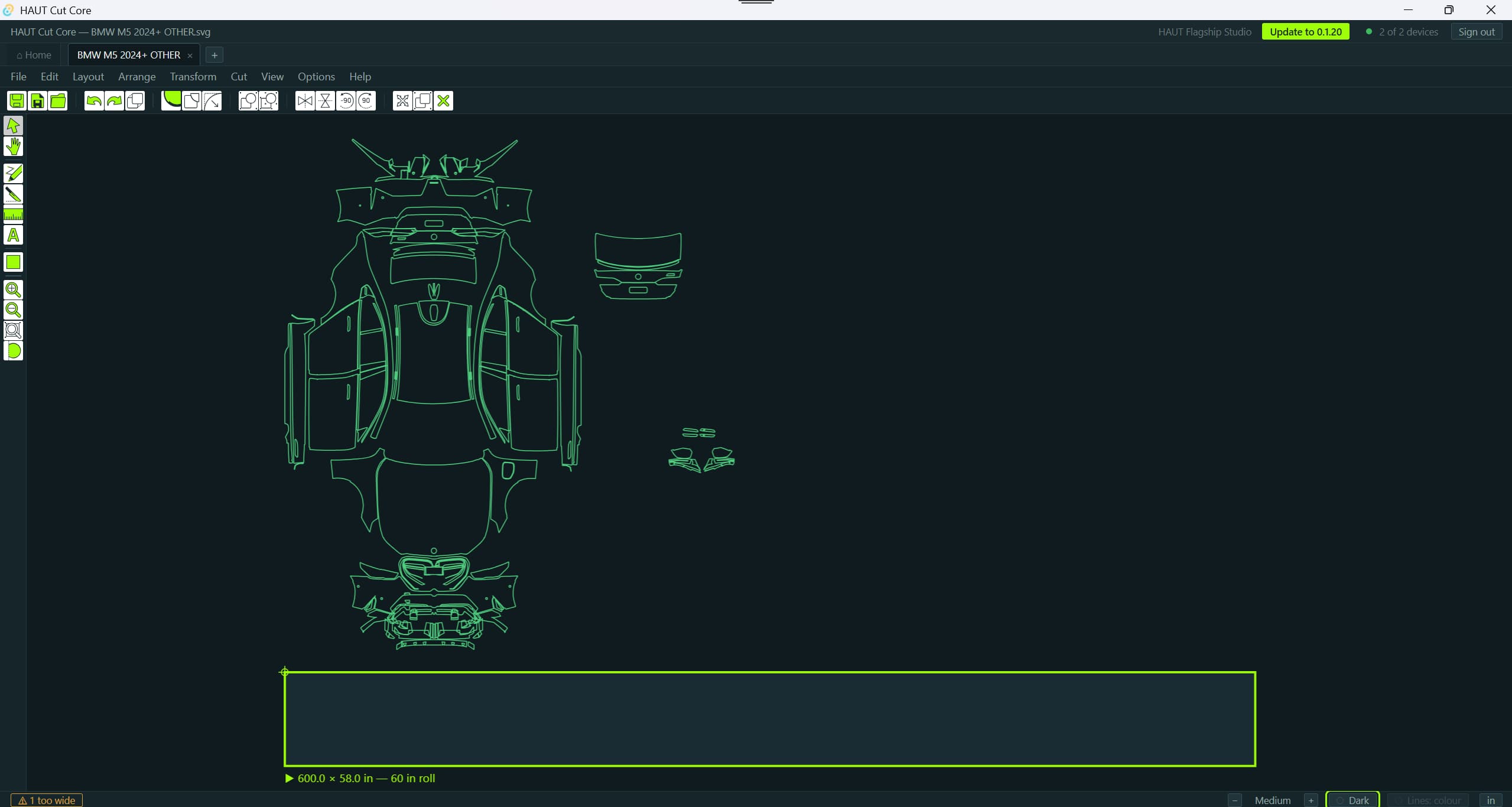
This is the same file, seconds apart. Left as the catalog delivers it, a kit is arranged in the shape of the car — readable, and hopeless as a cutting plan. Nested, it is a cutting plan.
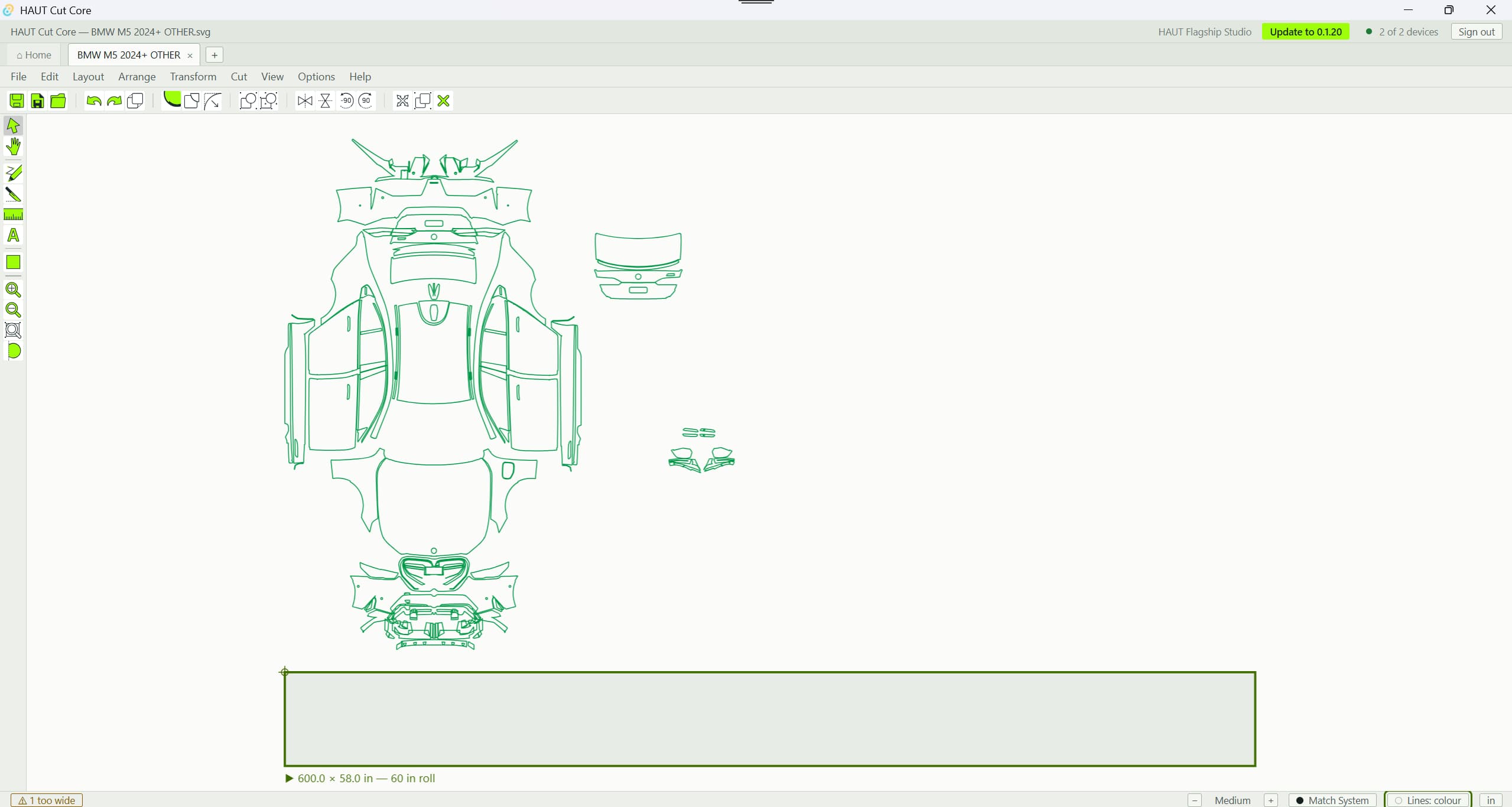
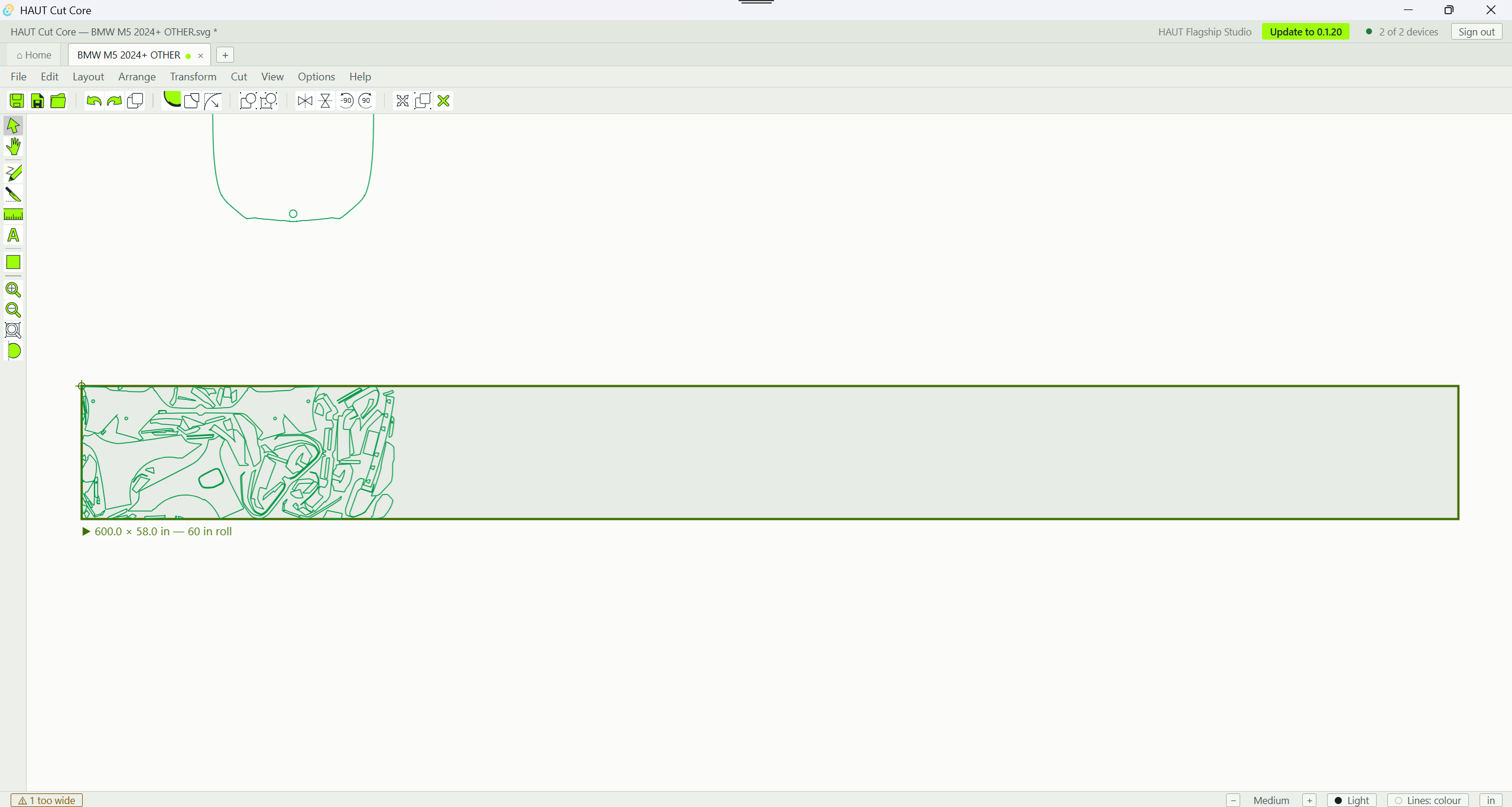
A BMW M5 kit straight from the catalog, laid over a 600 × 58 in blank cut from a 60-inch roll.
True shape, not bounding box
Parts interlock along their real outline. A bounding box leaves the space inside every curve unused, and on a bumper that space is most of the part.
Or one part at a time
Right-click a panel, Add to Blank, and it drops into the first real gap on the film — the way a shop works when a customer buys a front end rather than a full kit.
On a real delivered kit
A scattered layout spanning 83.5 inches of a 60-inch roll packed into 21.6 inches of it, at 78.8 % density, in about three seconds.
Themes and scale
Readable at the front desk and in the bay at midnight
The front desk works under fluorescents. The cutting station is in a bay at eleven at night. Neither of them should be squinting at the other one's screen.
The same BMW M5 file in both themes, split down the middle. Drag the handle — or use the arrow keys — to move the join.
Match System, or override it
The app follows the operating system by default. Light and Dark override it per machine, so the front desk can run light while the cutting station runs dark.
Lines: black, or lines: colour
A separate switch decides whether the pattern draws in flat black or in its own colours, so a kit reads against either ground.
Five interface sizes
Small to Maximum — icons, type, rows and fields scale together. Units switch on the same status bar, and every field, readout and quote follows.
The catalog
2,500+ vehicles. 115+ makes. Published weekly.
A catalog is only useful if you can get to the car in front of you. Library → Year → Make → Model, each filter narrowing the next.
- Every vehicle carries the layout map — parts arranged in the shape of the car, so an installer sees at a glance which piece goes where — plus a photo of the vehicle. Both open full screen.
- Trims, body styles, chassis codes and year ranges are separate fields, so an Audi RS3 Sportback is not the same row as an RS3 Saloon.
- Can't find a car? One button files a request with year, make, model, trim and photographs. Our designers draw it and it appears in your catalog.
- Files open in tabs. Open the Q7 interior, open the RS4, jump back to the catalog, keep your place.
In the editor
- Edge Wrap — our name for the PPF wrap allowance. Pick one edge, several, or a whole contour; set the amount, run-out angle and joint radius. Overlapping allowances never add up.
- Slice — a straight cut or a curved arc cut, so a bikini cut across a bonnet and both wings is one continuous line through all three parts.
- Cut in Half — one command, no line to draw, exact to a hundred-thousandth of an inch.
- Full node editing — marquee a run of nodes, bend a curve by its handle, insert a node where you point, set the start point, reverse the cut direction.
- Rulers, guides and a measure tool that keeps every measurement on screen so you can compare them.
Your plotter
It cuts on practically every plotter in the trade
The app sends plain HP-GL — the language cutting plotters already speak — so the machine already standing in your bay is almost certainly supported, whatever badge is on it. Drivers for the common machines ship with the app, and if yours needs its own we write it from the manufacturer's manual. Then cut one calibration rectangle, type in what you measured, and the app is certified for your machine — measured, not assumed.
Nothing but geometry
Pure HP-GL. No G-code, no cutting conditions. Force, speed and blade offset stay exactly where you set them on the machine.
It refuses impossible jobs
A plotter bound to a laser printer queue, a port switched to print-to-file, a part wider than the machine — blocked before the job is logged, not after the film is spent.
Two calibration jobs
A one-inch test square to prove the connection, and a 10 × 6 inch rectangle that proves scale, axis and origin on a machine we have not stood in front of.
Two seats
The front desk quotes while the bay cuts
Every shop license includes 2 machines, and they do different jobs.
The cutting station
The computer wired to the plotter. It cuts. A second cutting station is available for shops running two plotters.
The manager's seat
The front desk. Lay a kit out, nest it, measure it, price it, save it — everything except sending to the blade. Quote a job without waiting for the bay to be free.
Film and credit
Every roll carries its own cutting
A 60 in × 50 ft roll is 250 sq ft of film — and 250 sq ft of cutting credit lands in your account when it ships.
Buy film in the app
60-inch × 50-foot rolls of HAUT PPF, ordered from the dashboard and shipped to your shop.
Cutting credit included
A fifth of what you pay for a roll comes straight back as cutting credit in your account.
Or buy credit on its own
By the square foot or by the pack, if you cut film you did not buy from us. Balance, history and every cut on one screen.
Licensing
One subscription, monthly or annual
A shop applies, we approve, and only then does the shop enter payment details — no card is asked for on the application. We quote the subscription when we approve you, and the annual term costs less than paying by the month.
In every plan
- Two machines — one cutting station, one manager's seat
- The full pattern catalog for your libraries, and every new vehicle added
- Every tool in the editor, every plotter driver, every update
- Ten new vehicles a day (fair-use protection — ask and we raise it)
- Support and diagnostics
Optional
- Cutting credit packs and per-square-foot credit
- HAUT PPF rolls, with cutting credit included
- A second cutting station for a shop running two plotters
Getting started
Four steps from download to first cut
- 01
Download it
Mac or Windows, under 12 MB, and no account needed to install it. What it opens on is the application — there is nothing behind that screen until a person here has approved you.
- 02
Apply on the first screen
Who you are, where you install and what you run today. Two minutes. No card, no password, no credit check.
- 03
Approval, then your code
A person here reads the application, usually within two business days. Enter the invitation code from the email, choose your password, and your shop, catalog and license are ready.
- 04
Set up and cut
The app walks you through connecting your plotter, recognises it by name, and offers a one-inch test square before you touch a customer's film.
The manual
Every screen in the program, written down
One page: ten chapters in the order a shop meets them, English, Russian, Spanish and Portuguese with a switcher, search across the whole thing, and screenshots taken from the running program in each language. It ships with the software, so it always describes the version you are on.
- Getting started — download, install, apply, enter the invitation code, and set the plotter up on Windows or macOS
- The shop's account — rates, film prices, markup, installers, tax, letterhead, license and seats
- The catalog — finding a vehicle, and asking for one that is not there yet
- The editor — the window, moving around, theme and units, importing, selecting
- The material blank
- Working the parts — every tool, every field, and what each one refuses to do
- Nesting
- Cutting — sending the job, the cut order, printing the layout
- Quoting the customer — packages, the quote, discount, tax, card fee
- Reference — troubleshooting, support, every menu row and every keyboard shortcut
Free to read, no account needed — including the screens a shop only sees once it has a license.
Specs and security
The technical detail
Platform
- macOS (Apple Silicon and Intel, one universal build) and Windows 10/11 64-bit
- Install size under 12 MB
- Signed and notarised on macOS — no Gatekeeper warnings
- Automatic updates, cryptographically signed
- Import: SVG · Output: HP-GL only
- Imperial and metric throughout
- Internet required to cut (license verification and job logging). Layout, nesting and quoting work whenever the app is open.
Licensing and security
- The license is bound to your machines and verified by the app, offline cache included.
- Patterns are issued per download and never left on your disk as files anyone can copy.
- Every cut is logged against your shop, so your material usage report is real data.
- Only HAUT can free a seat — a license cannot be walked around a workshop, which is what keeps the price where it is for shops that play fair.
- Your business data is yours. Nothing in the app exports a customer's pattern to a file.
HAUT Software, answered
Ready to cut on it?
HAUT Software is licensed to approved shops. Apply and a person here will read it — or download it now and have it installed before your account is live.
Already have a shop account? Sign in to your dashboard.